Reading the Reports dashboard
The Reports dashboard gives you a data-driven view of your workforce's attendance, overtime, and absence patterns. Use it to spot trends, manage performance, and prepare for HR conversations.
Open the Reports page
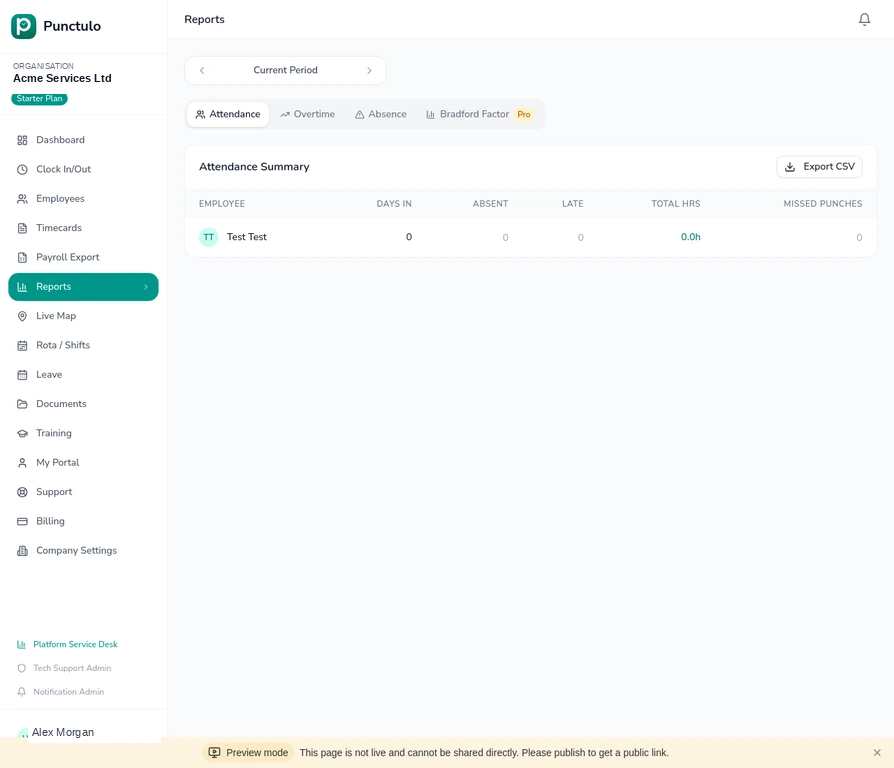
Click Reports in the left-hand sidebar. The page opens on the Attendance tab by default, showing a summary table for the current period.
Navigate between report types
Use the tab bar at the top to switch between four report types: Attendance, Overtime, Absence, and Bradford Factor. Each tab shows a different view of the same underlying data.
Read the Attendance Summary
The Attendance tab shows each employee's Days In, Absent, Late, Total Hours, and Missed Punches for the selected period. Use this to identify employees who are frequently absent or late.
Click on an employee's row to drill down into their individual punch history for the period.
Analyse overtime with the Overtime tab
Switch to the Overtime tab to see which employees have worked beyond their contracted hours. The table shows regular hours, overtime hours, and the overtime percentage for each employee.
Monitor absence trends
The Absence tab shows absence events by employee and type (sick, unauthorised, approved leave). Use this data to identify patterns — for example, employees who are frequently absent on Mondays or Fridays.
Absence data is only as accurate as the records entered. Make sure managers are recording all leave events in Punctulo.
Use the Bradford Factor (Pro plan)
The Bradford Factor tab calculates a score for each employee based on the frequency and duration of their absences. A higher score indicates a more disruptive absence pattern. This is a standard HR tool used in disciplinary processes.
The Bradford Factor report is available on the Pro plan. If you're on the Starter or Growth plan, upgrade via the Billing page to unlock this feature.
Export report data
Click Export CSV in the top-right corner of any report tab to download the data as a spreadsheet. The Bradford Factor export includes each employee's score, number of absence spells, and total absent days — useful for sharing with HR or preparing for disciplinary meetings.