Using the Live Map
The Live Map gives managers a real-time view of where field staff are located. Every clock-in event captures a GPS coordinate, and the map plots those locations so you can see at a glance who is on-site and where.
Open the Live Map
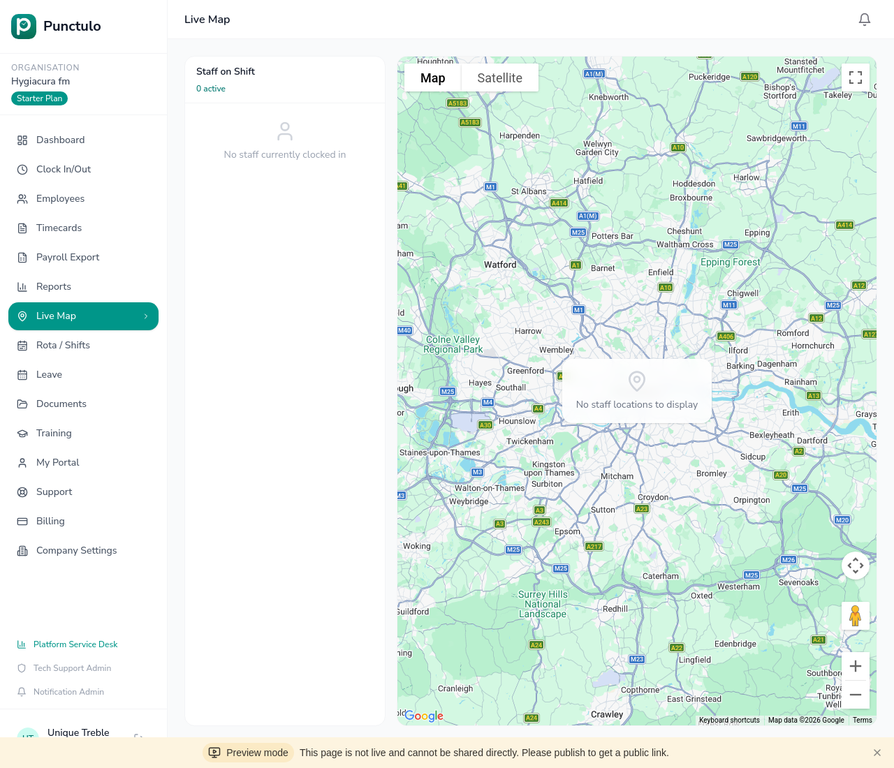
Click Live Map in the left-hand sidebar. The map loads centred on the UK by default and will zoom to show your staff locations once they have clocked in.
Read the Staff on Shift panel
On the left side of the map you'll see the Staff on Shift panel. It shows a count of active staff and a list of employees who are currently clocked in. Each entry shows their name and current status.
View a staff member's location
When an employee clocks in, a map pin appears at their GPS location. Click the pin to see the employee's name, clock-in time, and the address of their location.
The map updates automatically. If a staff member clocks out, their pin is removed from the map.
Switch between Map and Satellite view
Use the Map / Satellite toggle in the top-left corner of the map to switch between a standard road map and satellite imagery. Satellite view is useful for identifying specific buildings or site entrances.